To connect sensitive electronics to your generator’s USB and 12 V DC ports safely, guarantee proper voltage regulation and surge protection are in place. Use compatible cables and secure connections to avoid damage or interruptions. Consider adding external surge protectors if needed and keep your setup dry and well-maintained. Properly safeguarding your devices can prevent costly mishaps. Keep exploring to discover detailed tips on maintaining safe and reliable power delivery for your electronics.
Key Takeaways
- Use built-in or external surge protectors to safeguard sensitive electronics from voltage spikes.
- Ensure USB and 12 V DC ports are compatible with your devices’ voltage and current requirements.
- Avoid forcing plugs into ports; verify secure, snug connections to prevent damage and intermittent power.
- Keep connections dry, clean, and free from dust or moisture to maintain safe and reliable operation.
- Regularly inspect and maintain cables and ports to prevent wear, damage, and ensure proper power delivery.

Connecting sensitive electronics requires careful attention to detail to prevent damage and guarantee ideal performance. When you’re hooking up devices like laptops, medical equipment, or audio gear to your generator, it’s essential to consider how power is supplied. Using USB and 12 V DC ports on your generator can be convenient, but they also demand proper handling to protect your equipment. One of the most important aspects is ensuring proper battery regulation. Your generator’s power output must be consistent and within safe limits to avoid voltage fluctuations that could harm delicate electronics. Many modern generators incorporate built-in voltage regulation features, but it’s wise to verify this before connecting sensitive devices. Proper battery regulation prevents overcharging or underpowering your equipment, which can cause long-term damage or data loss. Additionally, staying informed about power regulation ensures you understand how to maintain stable voltage levels for your devices.
Ensuring proper battery regulation safeguards sensitive electronics from voltage fluctuations and potential damage.
Surge protection is equally critical when connecting sensitive electronics. Power surges, even brief ones, can fry circuits or cause irreversible damage. To avoid this, always use surge protectors designed specifically for electronic devices. Many USB ports on generators come with integrated surge protection, but if yours doesn’t, you should add an external surge protector. This extra layer of defense ensures that sudden spikes in power—caused by switching loads or electrical faults—won’t reach your valuable gear. When dealing with 12 V DC ports, the risk of surges can be even higher due to fluctuations in engine speed or load changes. Using a dedicated surge protector or a voltage stabilizer can help mitigate these risks, ensuring steady power delivery.
Another tip is to keep your connections secure and avoid forcing plugs into ports that don’t fit snugly. Loose connections can cause intermittent power or sparks, which are dangerous for sensitive electronics. Always check that your USB and 12 V DC connectors are compatible with your devices and that they fit firmly into the ports. Additionally, consider using appropriate adapters or converters if necessary to match voltage and current specifications. This prevents accidental overloads that could damage both the port and your device.
Finally, be mindful of your environment when connecting electronics. Keep your generator in a dry, well-ventilated area, and avoid exposing your connections to moisture or dust, which can cause shorts or corrosion. Regularly inspect your cables and ports for wear and tear, replacing any damaged components promptly. By paying close attention to battery regulation, implementing surge protection, and maintaining secure, clean connections, you can safely power your sensitive electronics with your generator. This approach not only preserves your equipment but also ensures reliable operation whenever you need portable power.

6 Ft Surge Protector Power Strip – 8 Widely Outlets with 4 USB Ports, 3 Side Outlet Extender with 6 Feet Extension Cord, Flat Plug, Wall Mount, Desk USB Charging Station, ETL,Black
- Number of Outlets and USB Ports: 8 AC outlets and 4 USB ports
- Device Compatibility: Supports 120V to 240V circuits
- Design Features: 3-side outlet design with spacious spacing
As an affiliate, we earn on qualifying purchases.
As an affiliate, we earn on qualifying purchases.
Frequently Asked Questions
Can I Connect Multiple Sensitive Devices Simultaneously Without Overload?
Yes, you can connect multiple sensitive devices simultaneously without overload, but you need to manage power distribution carefully. Check your generator’s total wattage capacity and verify each device is compatible with the power output. Use a power strip with built-in overload protection if necessary, and avoid exceeding the combined wattage. Doing this helps prevent damage and keeps your sensitive electronics safe while running multiple devices at once.
What Safety Precautions Are Essential When Using USB and 12 V Ports?
Did you know that improper use of electrical ports causes over 50% of generator-related damages? When using USB and 12 V ports, always follow grounding practices to prevent static or electrical shocks. Use surge protection devices to shield sensitive electronics from voltage spikes. Never overload ports, and verify your connections are secure. These safety precautions keep your devices safe and your generator running reliably.
Do All Generators Support Both USB and 12 V DC Outputs?
Not all generators support both USB and 12 V DC outputs. You should check the generator’s compatibility and review its output specifications before connecting sensitive electronics. Some models include built-in USB ports and dedicated 12 V DC outlets, while others may only support one or neither. Always verify the specifications to guarantee your devices are compatible and safe to use, preventing potential damage or power issues.
How Do Temperature Fluctuations Affect Sensitive Electronics Connected to Generators?
Temperature fluctuations can impact your sensitive electronics by causing thermal expansion, which may lead to loose connections or damaged components. These changes can also affect device calibration, making your equipment less accurate or reliable. To protect your devices, keep them in a stable environment, use proper insulation, and regularly check connections. Avoid exposing electronics to extreme temperature swings, ensuring they operate smoothly and maintain proper calibration.
Are There Compatible Adapters for Non-Standard Connectors?
Yes, many adapters are compatible with non-standard connectors, but you need to verify their compatibility carefully. Adapter compatibility depends on matching connector standards and voltage requirements. You should verify the specific connector types and ensure the adapter supports your device’s power needs. Using the right adapter prevents damage, ensuring safe and reliable connections between your sensitive electronics and the generator’s USB or 12 V DC ports.

CERRXIAN DC12V Surge Protector 10kA Lightning Arrestor for Security Cameras, CCTV Systems, RS485 & Low Voltage Equipment
- High Surge Protection: Withstands up to 10kA impulse current
- Wide Compatibility: Suitable for CCTV, access control, RS485, and more
- Durable & Fire-Resistant: Made with UL94-V0 aluminum alloy casing
As an affiliate, we earn on qualifying purchases.
As an affiliate, we earn on qualifying purchases.
Conclusion
By mastering how to connect sensitive electronics with USB and 12V DC ports on your generator, you’re accessing a power so immense, it’s almost like having a portable energy fortress! No more worries about fragile devices frying or losing power in emergencies. With these connections, you’re wielding the ultimate control over your gadgets—like a tech superhero. So go ahead, conquer your power needs and turn your generator into an unstoppable force of electronic mastery!
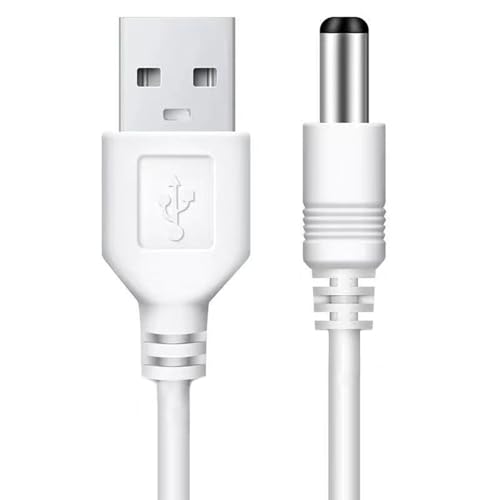
WZ USB Charging Cable for Hydrogen Water Generator Bottle, USB to DC
- High Quality: OEM replacement USB charging cord
- Connector Type & Compatibility: USB Type A to DC, compatible with hydrogen water bottles
- Cable Length: 39.4 inches (1 meter)
As an affiliate, we earn on qualifying purchases.
As an affiliate, we earn on qualifying purchases.

DB Electrical Regulator 12 Volt Replaces Arrowhead GDR6004
- Unit Type: External 12V Generator Regulator
- Replaces OEM Numbers: Multiple OEM part numbers included
- Warranty: 1-year replacement warranty
As an affiliate, we earn on qualifying purchases.
As an affiliate, we earn on qualifying purchases.


![Samsung Reportedly Bringing This Major Redesign Back From The Dead With Galaxy S27 [Gallery]](https://invertergeneratorhq.com/wp-content/uploads/2026/08/samsung-reportedly-bringing-this-major-redesign-back-from-the-dead-with-galaxy-s-featured-260x140.jpg)